
You have an upcoming HIPAA audit, new telehealth or remote-work requirements, a recent security incident, or a contract demand that requires demonstrable HIPAA-compliant training and data protection. Whatever started your search, you need an LMS for HIPAA compliance training that helps you deliver, track, and document your HIPAA training whenever someone asks.
HIPAA sets clear training and security requirements, but it doesn’t tell you which LMS features help support them. That’s because the HIPAA Security Rule is flexible, scalable, and technology-neutral, so it doesn’t dictate the specific security measures an organization must use. It’s up to you to turn those requirements into your own questions.
You’ll find yourself asking those questions while preparing an RFP or sitting in a healthcare LMS demo. Can the platform show who completed security training this quarter? Can it restrict records by role? Can it still produce a completion record six years from now?
Each question points to a feature to watch for in a healthcare LMS: access controls, encryption, audit logs, business associate agreements, reporting, and evidence of completion.
This guide matches HIPAA training requirements to the features to look for in an LMS for HIPAA compliance training. It gives you a healthcare LMS evaluation checklist to shortlist and compare platforms.
Simplify HIPAA compliance training with Brightspace
Brightspace helps healthcare organizations assign the right training to the right roles, remind learners before deadlines, and keep completion records ready for reporting.
What HIPAA requires from your training program
Two parts of the HIPAA Act should determine the structure of your training program:
- The Privacy Rule
- The Security Rule
| Requirement | Rule | What it means for training |
|---|---|---|
| Privacy Rule training | 45 CFR 164.530(b) | Train all workforce members on privacy policies; new members within a reasonable period; retrain when a material policy change affects their role |
| Security awareness and training | 45 CFR 164.308(a)(5) | Run a security awareness program, including periodic security reminders, malware protection, login monitoring, and password management |
| Documentation | 45 CFR 164.530(b)(2)(ii) | Document that the training was provided |
| Retention | 45 CFR 164.530(j) and 164.316(b)(2) | Keep that documentation for six years |
The Privacy Rule governs how your workforce handles protected health information. Under 45 CFR 164.530(b), you must train every worker on your privacy policies and procedures, as far as their role requires.
You must also train new hires within a reasonable period after they join. Anyone whose job is affected by a material policy change must be retrained within a reasonable period after the change takes effect.
Privacy Rule compliance means documenting that each of these training sessions happened.
Second, the Security Rule (45 CFR 164.308(a)(5)) requires a security awareness and training program for all workers, including management.
It covers four areas:
- Periodic security reminders
- Protection from malicious software
- Log-in monitoring
- Password management
For Security Rule compliance, that means training your staff on security throughout the year.
Note: Both rules expect you to keep records. You must retain the training documentation for six years from the date it was created or the date it was last in effect, whichever is later.
Now let’s review the LMS features that help support HIPAA compliance requirements.
HIPAA compliance requirements mapped to LMS features
The table below connects each HIPAA requirement to the LMS feature that supports it and the records that can document it.
| HIPAA requirement | LMS feature | Supporting records |
|---|---|---|
| Train new workforce members within a reasonable period | Role-based auto-enrollment triggered by HR system data | Enrollment date compared with hire date |
| Retrain after material policy changes | Bulk re-enrollment and versioned courses | Retraining log per policy version |
| Periodic security reminders | Automated reminders, recurring assignments, and microlearning | Reminder and assignment history |
| Minimum necessary access | Role-based access controls | Role and permission reports |
| Protect data at rest and in transit (164.312(a)(2)(iv), 164.312(e)(1)) | Encryption | Named encryption standards and independent audit reports |
| Record system activity (164.312(b)) | Audit trails | Activity log exports |
| Document that training happened | Automated tracking, compliance reporting, and dashboards | Completion and attestation exports |
| Six-year retention | Retention settings and data exports | Archived records by year |
Training new hires and policy changes: automated role-based enrollment
HIPAA’s Privacy Rule requires training for new workforce members within a reasonable period after they join. Staff whose roles are affected by a change in your privacy policies must also be retrained within a reasonable period after that change takes effect.
So look for a healthcare LMS that enrolls people automatically when they appear in your HR system, based on their role. For example, a newly hired nurse, billing specialist, or health information manager should land in the right HIPAA training on day one, without anyone sending an invite.
When the policy changes, the platform should re-enroll all affected teams together. It should also keep records for the old and new versions separate. That way, you can show who was trained on the original policy and who completed the update, and when.
When the hospital administrator asks, the LMS should show each new hire’s start date next to the date they completed the training. It should also show everyone who completed each policy update.
Periodic security reminders: recurring assignments and alerts
Ransomware-driven system intrusions made up most healthcare breaches in Verizon’s 2026 Data Breach Investigations Report, with exploited vulnerabilities, phishing, stolen credentials, and employee errors among the leading ways in.
You need an LMS that schedules recurring assignments, sends automated reminders before deadlines, and supports short microlearning refreshers between annual courses to help your team stay alert to these risks.
The HHS’s proposed Security Rule update, published January 6, 2025, would set specific timing requirements for security training. While the rule isn’t final, HHS’s regulatory agenda now targets July 2027 for a final version. If your LMS automates recurring security training, you may be better positioned to adapt when HHS releases the updated rule.
HIPAA minimum necessary access: role-based access controls and user authentication
HIPAA’s minimum necessary standard says people should only see what their role needs, and your LMS should work the same way. An LMS with role-based access controls allows you to set roles by department and job function, so a unit manager sees their team’s progress while a compliance officer sees reports for the whole organization.
Then make sure only the right person can use each login. That’s what user authentication does. Single sign-on allows staff to log in with the same work account they already use, so when you deactivate that account after someone leaves, their LMS access ends too. At a minimum, the LMS should support two-factor authentication for administrators, such as a code sent to a phone, because their accounts can see the most.
Protecting data at rest and in transit: encryption and security protocols in a healthcare LMS
Data encryption protects sensitive information in an LMS so it’s unreadable to anyone without the right key, even if a system is breached.
A healthcare LMS should protect data both at rest and in transit. Data at rest is information stored in a database, like files in a cabinet. Data in transit is information moving between systems, like a sealed envelope traveling through the mail. Encryption should cover both, so your records stay protected whether they’re stored or being sent.
And don’t just settle for an end-to-end encryption description on the LMS feature page. Ask the LMS sales team to name their security protocols, for example, AES-256 for secure data storage and TLS 1.2 or higher for data in transit. Then ask for proof from independent audits, such as ISO 27001 certification or a SOC 2 Type II report.
Ask about data backup and disaster recovery, too. If a server fails, you need to know the vendor can restore your records, and how quickly.
Encryption is currently a flexible (“addressable”) safeguard under the HIPAA Security Rule. HHS’s proposed update would make it required, with limited exceptions. Choosing a platform that already meets that bar may mean fewer changes later.
Recording system activity: Audit trails
Audit trails record what happens inside your LMS and who did it. A useful one captures logins, enrollments, course completions, admin changes (such as edited due dates or updated roles), and data exports.
When you speak with LMS sales teams, ask these three questions:
- What does the system log?
- Can anyone, including administrators, edit or delete those logs?
- How long are logs kept, and can we export them?
The answers will tell you whether the LMS can show who did what in the system.
Documenting training: compliance reporting and six-year record retention
HIPAA requires you to document that training was provided and keep that documentation for six years. Records of someone who left your organization years ago may still need to be on file.
A good LMS compliance dashboard shows, in real time, who has completed their training, who is due, and who is overdue. You can filter that view by role, department, or site and schedule regular reports for leadership.
When a contract partner asks for proof, you should be able to export these five records in minutes:
| Record | What it proves | Where it comes from |
| Training roster by role | Everyone required was assigned | Enrollment reports |
| Completion dates | Training happened on time | Completion reports |
| Assessment scores | Learners understood the content | Quiz and gradebook reports |
| Policy attestations | Learners acknowledged each policy | Attestation or checklist records |
| Retraining log | Material policy changes were trained | Assignment history by course version |
LMS for HIPAA compliance training evaluation checklist
Use this checklist to choose healthcare LMS software based on the features that matter for HIPAA compliance. This checklist will also help you see past general compliance training LMS platforms to what a healthcare organization needs.
But before you talk to any LMS sales rep, you must know if protected health information (PHI) will enter the LMS.
For most HIPAA training, the answer is no. Records an employer holds about its own employees, such as training completions, are excluded from the PHI definition. De-identified data isn’t PHI either. So policy courses, quizzes, and completion records can run on the platform without any patient data.
Your answer decides which track of the checklist applies and whether you need a business associate agreement.
| If your training includes… | PHI in the LMS? | What you need |
|---|---|---|
| Policy courses, quizzes, and completion records | No | Strong security, reporting, and six-year retention |
| Case studies built from de-identified or synthetic data | No | A documented de-identification process |
| Learner uploads of clinical documentation | Possibly | Restricted uploads or redesigned assignments |
| Real patient cases, EHR screenshots, or recorded patient encounters | Yes | A signed business associate agreement and Track B checks, or a redesign that removes PHI |
| Integrations that send patient data from clinical systems | Yes | A business associate agreement and an integration review; limit feeds to roster and completion data |
It’s better if you keep PHI out of your training, and that doesn’t make the training less realistic. You can build case scenarios from synthetic data or data de-identified using HHS’s de-identification guidance.
Also, use mock EHR screens for clinical readiness training, and restrict what learners can upload, the same care you’d apply to student privacy in online learning. That’s secure data handling built into your training design.
If no PHI will enter your LMS, use Track A. If it will, use Track B, which adds the extra checks you need on top of Track A.

Track A: training without protected health information
If your training keeps patient data out of the platform, these are the questions to ask every LMS’s sales team:
| Check | Questions to ask the platform sales team |
|---|---|
| Independent audits | Which certifications and reports do you hold (ISO 27001, 27701, 27018; SOC 2 Type II), and can we review them? |
| Encryption | Which encryption standards protect data at rest and in transit? |
| Authentication | Do you support SSO and MFA for admins and learners? |
| Access control | Can we restrict access by role, department, and site? |
| Audit trails | What do you log, and for how long? |
| Reporting | Can we schedule compliance reports and export them? |
| Retention | Can we keep training records for six years? |
| Uptime and backup | What is your uptime target and disaster recovery setup? |
| Data residency | Where is our data hosted? |
| Content standards | Do you support SCORM compliance and xAPI for our existing courses? |
| Healthcare fit | Does it work as a purpose-built healthcare LMS, with role paths and recertification automation? |
Shortlist any platform that answers the questions well. Remember that how you design and run the training determines whether your team retains what they learn, so pair your platform choice with proven compliance training best practices.
Track B: PHI in the LMS
If the LMS will store or transmit patient data, the LMS provider becomes a business associate under HIPAA. Use everything in Track A, then add these:
| Check | Questions to ask the platform sales team |
| Business associate agreement | Will you sign a business associate agreement, and can we review your standard terms? |
| Breach notification | How quickly will you notify us of a breach involving our data? |
| Subprocessors | Which third parties can access our data, and do they sign BAAs with you? |
| Data exit | How do you return and delete our data when the contract ends? |
| PHI access logging | Do you log every access to PHI, and can we review those logs? |
How Brightspace supports HIPAA compliance training
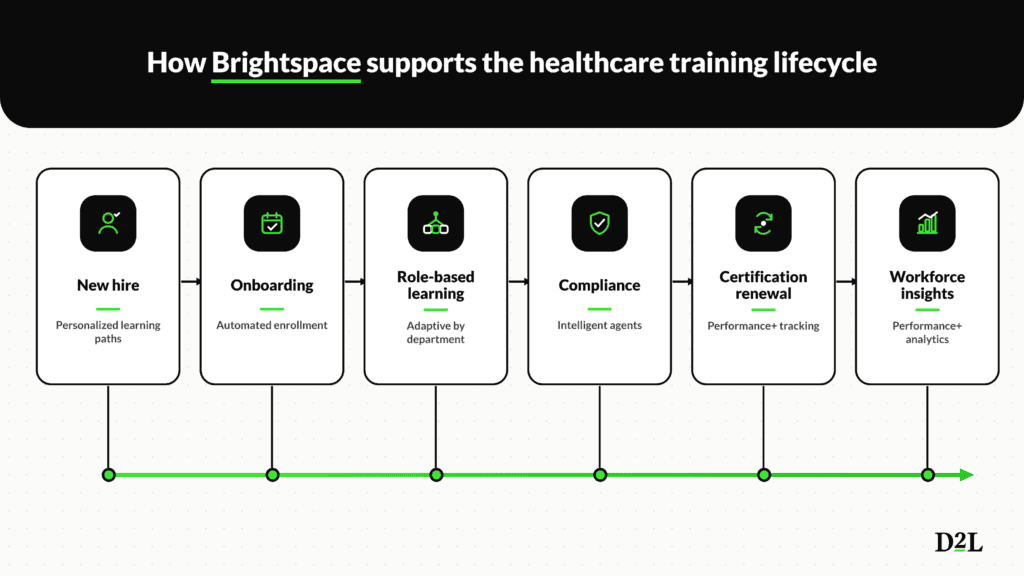
Brightspace supports and simplifies HIPAA compliance training through features like enrollment, role-based learning paths, training completion tracking and reporting, and more.
Compliance training doesn’t have to burden staff time or budgets. Epworth HealthCare, a not-for-profit private healthcare group and teaching hospital in Melbourne, Australia, partnered with D2LⓇ to offer a full spectrum of learning to staff.
With Brightspace, Epworth cut its compliance course from 25 to 10 minutes and reduced learning costs by 66%. Its online training now costs 25% of face-to-face training, a gap explored further in this comparison of online vs. in-person safety training costs.
Here’s how Brightspace supports each part of a HIPAA training program, in the same order as the requirements map above:
- Recurring training, reminders, and re-enrollment automated with Intelligent Agents: They watch for conditions you set, such as a new hire’s start date or an upcoming deadline, then automatically assign training, send reminders, and re-enroll staff. Most importantly, they reduce the manual effort of tracking recurring training.
- Role-based learning paths: Release conditions allow you to control what each learner sees and when, in the right order. This feature also makes it easier to connect HIPAA training to wider employee skills development.
- Security certifications: D2L has held ISO 27001 certification continuously since 2014. It also holds ISO 27701, 27017, and 27018 certifications, provides SOC reports, and is listed in the CSA STAR registry.
- D2L Performance+: Create, edit, and share custom dashboards and reports, such as training completion by role, department, or site. You can also schedule reports, alerts, and updates, so leaders get the latest data without anyone building reports by hand.
- Brightspace Pulse: The mobile app gives shift workers access to their courses on the go, including offline access to supported content when they can’t connect.
- D2L Creator+: It allows you to build interactive courses with more than 50 H5P content types and pre-built templates, with gradable activities linked to the Brightspace Gradebook. The American Nurses Association used Brightspace and Creator+ to cut course development time from about 150 to 30 days per course.
- Learning services: D2L’s implementation support and learning experts help your team design and launch training. That partnership helps turn compliance training into lasting healthcare talent development.
Stay on top of HIPAA training requirements
Automate recurring training, track every role, and keep evidence ready for your next review with Brightspace.
Frequently asked questions about an LMS for HIPAA compliance training
What should an LMS for HIPAA compliance training include?
The LMS supports HIPAA compliance with features such as automated role-based enrollment, recurring assignments and reminders, role-based access controls, user authentication, encryption, compliance reporting, and six-year record retention. But no LMS is compliant on its own. Compliance depends on how your organization configures and uses those features.
Does an LMS need a business associate agreement?
Only if it stores or transmits protected health information (PHI). Training records about your own employees aren’t PHI, so most HIPAA training doesn’t need one. Real patient cases or clinical system integrations would require a signed BAA.
How often is HIPAA training required?
HIPAA requires training for new hires within a reasonable period, for staff affected by material policy changes, and through periodic security reminders.
Should we build a custom LMS for HIPAA training?
Usually, no. Building a custom HIPAA-compliant LMS means paying for development, maintenance, security updates, and independent audits yourself, and it takes longer to launch. Many organizations are better served by a purpose-built healthcare LMS that already includes these features and security certifications.
Can a healthcare LMS support remote and telehealth staff?
Yes. Look for mobile access, offline learning for staff who can’t always connect, and remote-access security training covering home networks, personal devices, and secure communication.