Blended, hyflex, hybrid or fully virtual—whatever your preferred method of instruction, Brightspace has the tools you need to create dynamic and memorable educational experiences for all learners.
It’s easier to integrate technology that enhances your course and empowers students to reach their potential when you use the right tools.
Provide Instructional Flexibility
Provide Instructional Flexibility
Personalize the Learning Experience
Personalize the Learning Experience
Deliver Meaningful Assessment and Feedback
Deliver Meaningful Assessment and Feedback
Ensure Equity and Accessibility
Ensure Equity and Accessibility
Foster Impactful Collaboration
Foster Impactful Collaboration
Provide Instructional Flexibility
Learners can choose when and where they study, as well as how often they need to access material to fully understand a concept.
Access all your course content and activities in one convenient location.
With our mobile app, Brightspace Pulse, help learners stay connected and on track with Brightspace courses.
Schedule live discussions, office hours, video-based training and more.
Personalize the Learning Experience
Create, deliver and support differentiated and personalized learning experiences at scale, with fast semester rollover.
Release Conditions: Create a custom learning path through your course by automatically releasing enrichment or remediation content based on student achievement.
Accommodations: Easily set quiz time extensions and multipliers which will persist across all quizzes in a course.
Intelligent Agents: Deliver personalized feedback to keep learners on track with automated nudges.
Portfolio: Use portfolios to reflect on learning, showcase growth and celebrate achievements.
Student Success System: Identify and support at-risk learners early on with Performance+ Predictive Analytics by estimating final grades, understanding where they might need extra attention and planning ways to intervene.
Deliver Meaningful Assessment and Feedback
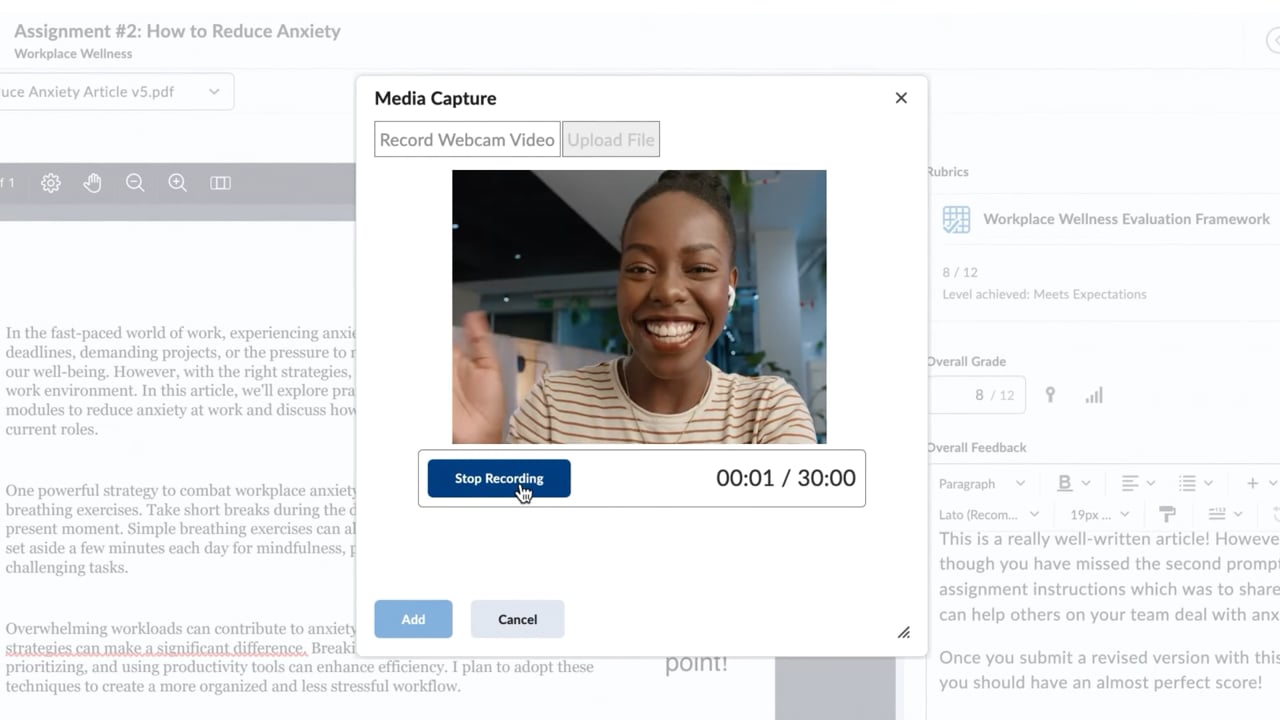
Educators can quickly provide meaningful feedback on formative and summative assessments with rubrics, grades, text, video and audio.
Video and Audio Note: Provide meaningful and individualized audio or visual feedback to learners.
Rubrics: Easily create or use existing rubrics to streamline your grading workflows. Access rubrics on your mobile device to assess students in the field.
Grades: Track grades and access detailed student statistics. Instructors can import, export or edit single or multiple grades.
Advanced Originality Detection: Ensure originality with embedded text analysis tools that identify potential plagiarism, paraphrasing and AI-generated writing.
Ensure Equity and Accessibility
Provide individualized support to learners with varying needs and help everyone reach their full potential.
Powerful data tools help identify students who may be struggling or disengaged, enabling instructors to step in early with personalized support.
Consistent course design across all devices ensures every student can access materials, regardless of the technology they have.
Flexible communication options help students connect with peers and instructors, fostering a stronger sense of belonging and support.
Foster Impactful Collaboration
Virtually interact and collaborate right in Brightspace.
Brightspace integrates with a number of video tools like Microsoft Teams, Google Meet and Class, so you can schedule, meet, host and record sessions without having to leave the LMS.
Connect face-to-face over video for instruction, assessment and feedback. Schedule live discussions, office hours, video-based training and more.
Set up forums and topics for learners to ask questions, discuss course content and assignments, and work together in assigned groups and sections.
Inspire Every Learner
Design and build unique course content for learners using Brightspace. We support you in delivering dynamic educational experiences that help unleash the potential in every learner.
Flexible Instruction
Say goodbye to location and time constraints: Brightspace allows you to combine the best of in-person and online learning, so that you can reach every learner.
Personalized Learning
Create and deliver personalized learning experiences at scale, with fast semester rollover.
Assessments and Feedback
Deliver formative and summative assessments and provide feedback on each through rubrics, video, audio or text.
Equity and Accessibility
No two learners are alike: from learning styles to accessibility needs, Brightspace boasts a range of solutions that support equity and inclusion.
Foster Impactful Collaboration
Studying in isolation can be challenging. Give learners the chance to virtually interact and collaborate with their peers in Brightspace.
Get a Free Demo
See what Brightspace can do for you with a free, personalized demo. Give us 20 minutes. We’ll give you more than two decades of experience helping organizations hit their goals.
Get all your questions answered—no sales pitch, no obligations
Discover tools and features that will help you the most
From an analytics perspective, D2L Brightspace has allowed us to broaden our data sets and give teams such as learner services a better view of what the student is accomplishing every day.
Richard Crowley Associate Vice President, Learning and Student Technology, Ultimate Medical Academy
Brightspace keeps getting better and better. I’m really excited to integrate new blended ways of learning into Brightspace: from snackable videos and informal quizzes to entire lectures and problem-based learning.
Dr. Chris Vigna Lecturer in the Department of Kinesiology and Health Sciences, and Associate Chair of Undergraduate Studies, University of Waterloo
Recognized for Service Excellence, Driven by Your Goals
Technology is just one part of the solution. From platform migration, course design to tailored service and everything in between, organizations like yours choose D2L for our award-winning and personalized approach to customer success, professional services and proactive support.
Education is the building block of many crucial skills like critical thinking, problem solving and…
Your Blended Learning FAQ – Answered
What is Blended Learning?
Blended learning is an instructional model that combines both online and offline instruction.
Blended learning doesn’t mean that a course is restructured so that the majority of it is online; instead, the in-person and online elements work together to create a richer learning experience for students.
What are some of the most popular models of blended learning?
There are several blended learning models in use today, including these:
Nurture Model: Prioritize in-person learning for the earliest students, scaling to most- or all-online learning in upper grades/years
Bookend Model: Host first-year and fourth-year students on campus while sophomore and junior courses remain online
Rotation Model: Divide classes into multiple groups and rotate online, in-person, and collaborative or lab-based learning
The right blended learning models for a given school, academic level, or discipline will vary. Your institution’s current technology offerings and physical space limitations also influence which model to use.
What is hybrid learning and how does it differ from blended learning?
While the terms hybrid learning and blended learning are used interchangeably, there is a slight difference between the two. Blended learning is centered on using online instruction such as videos, discussion boards and articles to complement in-person classes. Hybrid learning uses online material as an alternative to in-person material and is meant to create a flexible learning experience where students choose their learning model based on their needs.
Ready to Transform the Way the World Learns?
Whether you want to chat about Brightspace, blended learning, or our services, we’re ready to help.
I would absolutely suggest going with D2L. The platform offers a multitude of opportunities in how you present your content so it provides the student a better experience to learn from.Sheila UnwinExecutive Director, Curriculum ServicesAspen University







 I would absolutely suggest going with D2L. The platform offers a multitude of opportunities in how you present your content so it provides the student a better experience to learn from.Sheila UnwinExecutive Director, Curriculum ServicesAspen University